MCA Guide
Enhancing Museum Engagement
ROLE
UX Designer & Researcher
TIMELINE
Fall 2025
10-week academic project
SKILLS
UX Design, User Research, Usability Testing
The Problem
Balancing guidance with discovery
Museum visitors struggle to balance guided information with personal exploration, often finding themselves overwhelmed by content or disconnected from the art. Our goal was to enhance engagement with art by providing contextual information while minimizing disruption to the natural flow of appreciation.
RESEARCH
We talked to six people about their last museum visit
We interviewed six participants ranging from frequent museum-goers to rare visitors. Our goal was to understand what shapes a good museum experience.
The most surprising finding: people care far more about ambiance than navigation. Noise, crowds, and atmosphere were the top complaints. Maps and signage were secondary concerns. This reframed the problem the app actually needed to solve.
Other key findings:
Visitors prefer to wander and follow their interests rather than follow a set route or tour.
Phone use during the visit is low by choice. People don't want to be on their phones at a museum.
Photos are the primary way visitors reflect on and share the experience afterward.
When audio guides were used, they were consistently appreciated (but only when they didn't disrupt the natural flow of the visit).
Technology should enhance the museum experience, not compete with it.
pERSONAS
Two distinct visitors
Based on our research, we identified two distinct user types with different needs and motivations.
Henrik
The Spontaneous Explorer
An art-loving traveler visiting for the first time. Navigates by curiosity. Faces language barriers and wants to feel independent despite them. Checks photos and reviews before arriving, uses maps and signage once inside.
David
The Purposeful Learner
A frequent visitor who brings his kids. Balances his own curiosity with short attention spans. Wants clear explanations, family-friendly navigation, and a visit that feels educational without being exhausting.
DESIGN
Two features, one coherent experience
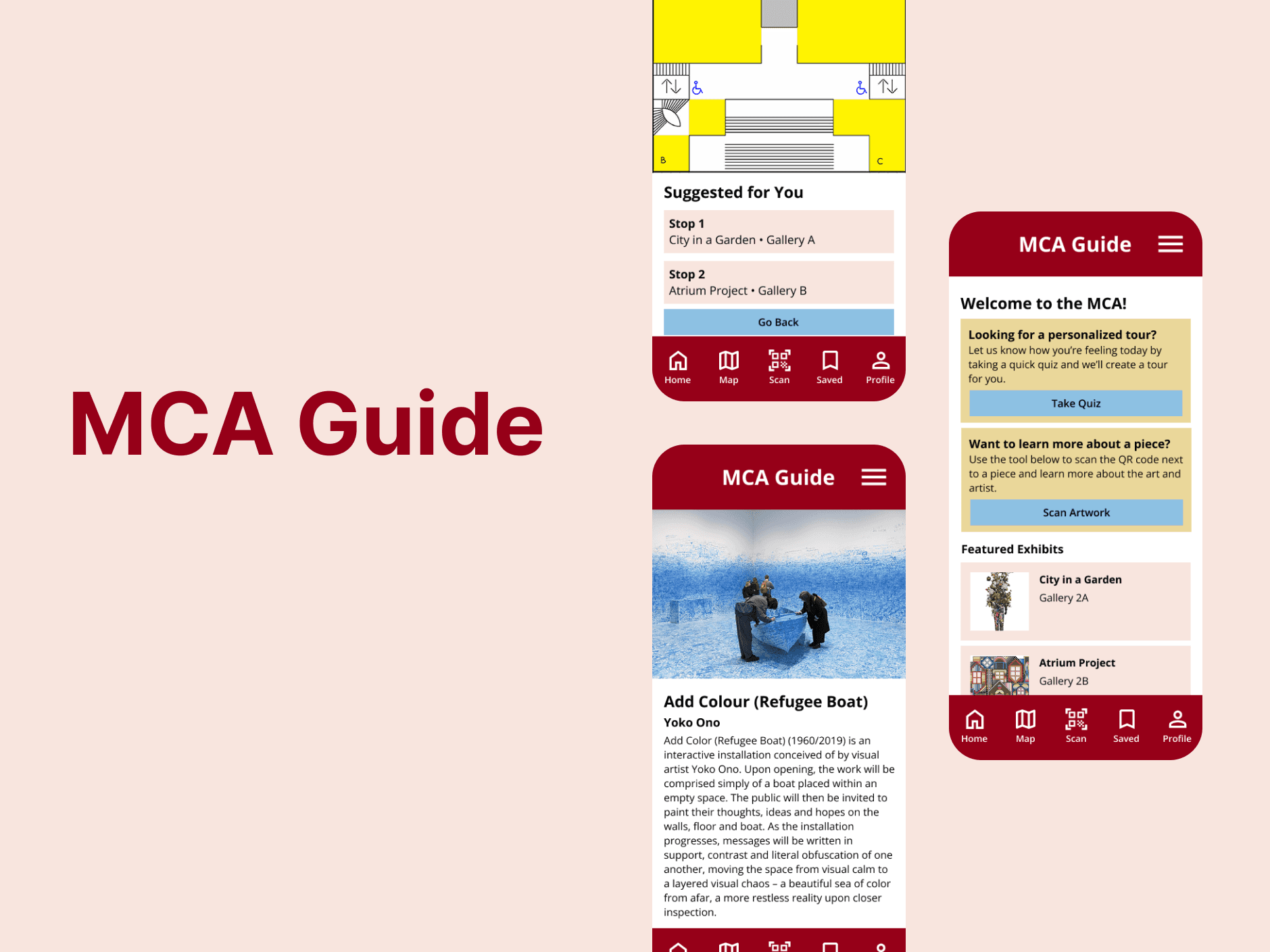
We focused our prototype on the two interactions that mattered most to each persona: QR code-based exhibit detail for David, and a mood-based interactive map for Henrik.
The QR code flow lets a visitor scan a code next to any piece to pull up context (artist background, historical notes, related works) without requiring them to open a menu or navigate the app.
The mood-based map asks visitors how they're feeling as they enter, then highlights exhibits that match — curious, reflective, energized. It's an opt-in personalization that respects the visitor's desire to wander while giving them a soft nudge.
Usability Testing
7 users, 2 tasks, one clear problem
Completed Task 1 (QR flow) with zero errors
Completed Task 2 (mood map), but several needed hints
Needed a hint to find the mood/curiosity feature
The QR code flow was immediately intuitive. Every participant completed it quickly, with no errors and no guidance needed. The mood-based map was a different story. Several users didn't understand why they were being asked about their feelings, and others weren't sure the prompt was part of the app's core navigation.
The concept was well-received once users got through it. Those who completed the mood map found it genuinely useful and engaging. The problem was discoverability and framing, not the idea itself.
Key design changes:
Add a clear "Plan My Visit" entry point on the home screen
Redesign the mood selector with visual cues and descriptions
Use color-coding on the map to distinguish recommended exhibits from the rest
REFLECTION
What I took away
The most valuable part of this project was the early research. Discovering that visitors care more about ambiance than navigation surprised us and heavily impacted our design decisions. Without those interviews, we would have built a much more information-heavy app that visitors wouldn't have wanted to open.
The personalization feature taught me that a good concept still needs a clear entry point. Users liked the mood map once they understood it. The design just didn't earn that understanding fast enough. Next time, I'd test the onboarding flow earlier and separately from the feature itself.